Security Information
This webpage sets out the security information of the electronic banking ("e-banking") services offered by Bank of China (Hong Kong) Limited ("BOCHK") and BOC Credit Card (International) Limited ("BOC Credit Card")(each named as "the Company", " we"). E-banking services refers to banking services delivered over the internet, wireless network, ATMs, telephone network or other electronic network, terminals or devices, including but not limited to the Company’s Internet Banking, Mobile Banking, Mobile Application, WeChat official account, Phone Banking, Automated Banking and online services of BOC Credit Card.
Latest Security Information: Beware of Mobile Device Malware Scams
- You should download BOCHK Mobile Banking (Personal and Corporate) and BoC Pay+ mobile application from official application stores or BOCHK official website.
- You should only download and install mobile applications provided by trusted and verified developers from official application stores, and should not download any mobile applications from unknown sources.
- Evaluate permissions requested from mobile applications carefully before installation, if suspicious permission rights are required, do not install the mobile application.
- Use the latest versions of operating system, mobile applications and browser.
- Do not jailbreak or root your mobile devices.
- Do not click on any hyperlinks from suspicious SMS messages, email, attachments, websites, social media pages/posts or unknown sources, download any attached files or scan any QR codes provided on those messages.
- Maintain proper configuration of mobile devices and do not allow installation of mobile applications from unknown sources.
- Never grant full control of your mobile device or share screen to any third party unless you're absolutely certain of the source's trustworthiness.
- You should ensure that your devices for accessing e-banking services do not being infected by virus or unauthorised accessed by malicious, corruptive or destructive program, for the retrieval, use and change of the authentication factors (for example, password, authentication tokens, biometric authentication (e.g. fingerprint, Face ID)) or personal information.
- Do not use applications from unknown sources under any circumstances. Do not visit suspicious websites or downloading any files from them.
- For other mobile banking security information, please refer to the following hyperlink:
https://www.bochk.com/en/security/mobile.html - If there is any question about the above malware scam information, please contact the Company's Customer Service Hotline at (852) 3988 2388.
- Please refer to the following hyperlink for The Hong Kong Association of Banks “Enhancement on security measures to safeguard customers against malware scams” information:
https://www.hkab.org.hk/en/news/press-release/292
Other Important Online Security Information: Protect your Personal Digital Keys, Beware of Fraudulent Links!
Internet banking account and personal information, Internet Banking login credentials, including Internet Banking number, usernames, authentication factors (for example, login passwords, one-time passwords (OTPs), biometric authentication (e.g. fingerprint, Face ID), the authentication token), are as important in the digital world as the keys to your home, and should be properly safeguarded; and also should not allow anyone else to use their authentication factors.
- Before inputting OTP as the transaction authorization for any online transaction (including credit card transaction), you should verify the details of transaction request carefully, such as merchant name, transaction type, amount and currency, in order to confirm these are actually referring to the intended transaction. Do not enter your OTP recklessly. If you have any enquiry, please contact us immediately.
- Ensure the website is genuine and reliable before inputting any information or conducting transaction.
- Before making payment by Mobile Phone No., E-mail Address, Faster Payment Identifier (FPS ID) or QR code, you should verify the details of payment request carefully, including the payee name. If you have any doubt, please confirm with the payee in advance.
- We will never ask for any sensitive personal information such as bank/ credit card/ investment/ insurance/ MPF account details, credit card number/security code, Internet Banking user name, login passwords and OTPs through phone calls, emails or instant electronic messages (e.g. SMS, WhatsApp, WeChat, etc). We will never request customers to provide any personal information through social media posts. To avoid being scammed, the Company advises the general public to remain vigilant and always verify the authenticity of social media posts. We will never send SMS or email messages with embedded hyperlinks, QR codes or attachments directing customers to the Company’s website or mobile applications to carry out transactions, or contact you via telephone voice messages. Please contact us immediately if you receive such request. If you receive any suspicious SMS or email messages with embedded hyperlinks purportedly to be from the Company requesting you to input any personal information, you should be vigilant and think twice. In case of doubt, please contact the Company's Customer Service Hotline at (852) 3988 2388.
- Do not believe unknown callers who claim themselves as bank staff or disclose your personal information, bank account number and password to them. Even if callers provide you with information of relevant bank staff members, it does not necessarily mean that they are genuine bank staff. Scammers can obtain such information by unlawful means. Stay alert when receiving calls purportedly made by bank staff. You should contact the Company's Customer Service Hotline at (852) 3988 2388 to verify their identities.
- Customers should be advised that they must inform the Company as soon as reasonably practicable after they find or believe that their authentication factors or devices for accessing the e-banking services have been compromised, lost or stolen, or that unauthorised transactions have been conducted over their accounts.
- To safeguard your online banking security, you should access Internet Banking through the Company’s official website. Please do not log in Internet Banking through hyperlinks in any email, SMS, QR code, search engine, social networking platform or any third-party website or mobile application not authorised by us. In case of doubt, please stop the operation and do not input any data. Please close the window, delete the application. For enquiry, please contact us immediately.
- Do not use unknown Wi-Fi or public computers to access Internet Banking services.
- Please be reminded to stay vigilant to anything abnormal when logging in Internet Banking. In case of doubt, do not follow the instructions of the suspicious web page or input any data. You are advised to close the window and contact us immediately.
- It is recommended to setup firewall and install anti-virus software / mobile security App in your mobile devices and update regularly. You can visit HKCERT website for reference: https://www.hkcert.org/resources/security-tools, to select the appropriate Apps.
- Review transactions record of BOC credit cards and BOC cards frequently through internet banking, mobile banking or statements to check if there is any suspicious or unauthorized transaction. The customer should notify the Company as soon as practicable after they identify unusual or suspicious transactions on their accounts.
- You should notify us for any change of your mobile phone number or email address without delay. You are requested to remain responsible for any unauthorised use of the e-banking services by others before we receive your notification.
- You should be aware of the obligations in relation to security for e-banking services and following the relevant security measures specified from time to time by us for the protection of customers. You may bear the risk of suffering or incurring any loss if not taking the security measures that we recommend.
Please refer to the following hyperlinks for Hong Kong Monetary Authority anti-deception information:
https://www.youtube.com/watch?v=qnj4HSGG0Vs (30-second version)
https://www.youtube.com/watch?v=EH3i6u6fD8g (Full version)
Starting from 28 January 2024, BOCHK has been using "Registered SMS Sender IDs": #BOCHK、#BOCHK_TXN or #BOCHK_CC to send SMS messages to customers’ registered mobile phone numbers.
BOCHK will continue to send "SMS messages of which receiving parties are expected to reply to the senders via phone numbers" or two-way alert SMS messages through any of the following phone numbers: +852 622649931110 or +852 645063570006 to customers’ registered mobile phone numbers when necessary, inviting you to reply whether you have logged in/made the transaction.
Please refer to the following e-Leaflet for Communications Authority information:
https://www.ofca.gov.hk/filemanager/ofca/Publicity/en/upload/65/SSRS_leaflet_Final_E.pdf
Online Security Tips and Information
What Have We Done to Protect You
- We have adopted the Transport Layer Security ("TLS") encryption to ensure the security of your data during transmission and prevent any unauthorised access by the third party to your data.
- Our web servers are protected by firewall systems to prevent any unauthorised access to our system.
- Your login attempts are recorded systematically. In the event of several consecutive login attempts with incorrect password, the related Internet Banking Services will be suspended immediately.
- Our Internet Banking Services will be automatically disconnected after remaining inactive (i.e. no operational instructions have been received) over a period of time to prevent unauthorised transaction.
- Our Internet Banking Services provide personal customers with “Mobile Token” or “Security Device” as a two-factor authentication tool, while corporate customers are offered a “Mobile Token”, “Security Device” or an e-Certificate as the two-factor authentication tool. This advanced security measure has been adopted to further verify your identity before the “Designated Transactions” or “Designated Investment Transactions” * could be conducted via the Internet Banking Services. For details, please refer to “Two-factor Authentication Tools”.
- During each login to Corporate Internet Banking using e-Certificate by corporate customers, our system will verify the identity of the user based on the information of the “e-Certificate”. To apply for an “e-Certificate”. Please contact your account opening branch. To learn more about its usage, please refer to the Certification Practice Statement of Digi-Sign Certification Services Limited at www.dg-sign.com.
Security Certificate
We use Extended Validation ("EV") SSL Certificate to allow you to verify the authenticity of our websites by checking the address bar of your browser. You can also check the certification details, including the issuer and validity date of the certificate and the other information, by clicking the "security lock" icon at the login page of our Internet Banking Services. Please note that the layouts may be different for different browser versions. For details on the EV SSL Certificate, please refer to the website of DigiCert, the issuer of the certificate.
Template:
BOCHK
Domain name issued to: "www.bochk.com", "its.bochk.com", "cib.bochk.com" or "igtb.bochk.com"
Issued by: DigiCert EV RSA CA G2
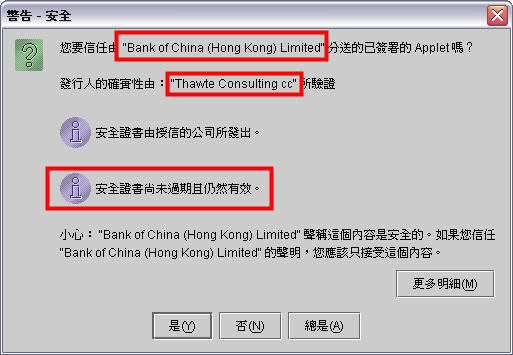
The system will run a specified Java applet programme on your personal computer when "e-Certificate" is used as an authentication tool by Corporate Internet Banking customers. For the sake of online security, most of the Internet browsers will create a pop-up window showing the "e-Certificate" signing authority and related authentication information for you to verify the programme.
If you are corporate customers, you are requested to check the following information before logging into Corporate Internet Banking:
1.Distributed by: "Bank of China (Hong Kong) Limited"
2.Publisher authenticity verified by: "Thawte Consulting cc"
3.Security certificate has not expired and is still valid
Recommended browsers for minimum security requirements
To ensure customer data security, please install any of the browser versions we recommend to log in Internet Banking.
Personal Internet Banking, iGTB NET
Microsoft Internet Explorer (Version 11 or above)
Microsoft Edge (Version 94 or above)
Mozilla Firefox (Version 91.2 or above)
Apple Safari (Version 14 or above)
Google Chrome (Version 95 or above)
Information Security Tips
- Beware of fraudulent website
You should be vigilant of any fraudulent websites which seek to pass off as our websites. When conducting transactions through electronic channels, you are advised to access your Internet Banking or Mobile Banking accounts by typing the website address of BOCHK (www.bochk.com) directly into the browser address bar, or through the BOCHK Mobile Application downloaded from official App stores or reliable sources. Unless you are certain that you are connected to our websites, particulars of your Internet Banking should not be provided. - Fraudulent phone call/emails/ SMS
Please beware that viruses, Trojan software and hacker programmes can be distributed via emails. Virus like "Worms" can even reproduce and deliver infected emails to the recipients in your address book. Hence, you should not open any unknown or suspicious emails. Instead, you should delete them immediately. Please do not log in Internet Banking and provide your payment card (including credit and BOC cards) credentials through hyperlinks or QR Code embedded in any emails or SMS. You should also perform virus scanning before opening any attachment. In addition, you should pay extra care as fraudsters will perpetrate frauds using emails/ SMS.
Please do not rely solely on email correspondences for any remittance transaction. You should use other channels (e.g. telephone, fax, etc.) to confirm the transaction and the beneficiary details before completing the remittance.
Example 1: Commercial email scam
A fraudster hacked into the email correspondences between a foreign buyer and its service provider over a few months. After getting to know the details of their transaction, the fraudster sent out fictitious emails at an email address very similar to that of the service provider, requesting the foreign buyer to make a remittance to a fraudulent account.
Example 2: Fraudulent claims of estate email
A fraudster claimed to be a bank staff in an email, inviting the recipient of the email to pretend to be the next-of-kin of a deceased client who has left a huge sum of unclaimed fixed deposit. Upon receiving favourable reply, the fraudster requested the recipient to pay a fee in advance for preparing the necessary documents in order to claim that estate. In the end, the email recipient was deceived.
Example 3: Fraudulent claims of refund email
A fraudster claimed to be a public service organisations/bank staff in an email, informing the recipient of a refund and inviting the recipient to click the hyperlink attached. The recipient was requested to provide personal information on a scam website, including Internet or Mobile Banking login information, and then the recipient’s funds might be transferred via Internet/Mobile Banking.
Example 4: Payment card phishing emails / SMS
Fraudsters recently sent out phishing emails or SMS messages embedded with fraudulent website hyperlinks which purported to be from Online Shopping Platform / Reward Scheme Platform / Postal Service / Courier Services / Government Departments / Banks for verification, reward redemption, refund, fee payment or information update. These phishing emails or SMS messages made different false claims such as falsely claiming that customers’ information in the platform should be updated to continue the services, or customer’s parcels could not be delivered and thus personal information should be updated or extra fee is required, or customer’s account was overcharged or automatic payment failed and thus credit card information should be provided to handle immediately, etc., and lured customers to click on the embedded hyperlinks in the messages and enter personal and payment card information.
Example 5: Phone Scammers Impersonating Bank Staff
Fraudsters called customers, posing as a bank staff member, and claimed that there were issues about the customer’s bank account (e.g. presence of suspicious illegal transaction records, involvement in money laundering, etc.) and the account would be frozen. Falsely claiming that they need to verify the customer’s identity, the fraudsters asked the victim to answer a number of questions so as to obtain a large amount of personal and bank account information. The fraudsters also asked the customer to transfer funds to a designated local bank account to “unfreeze” their account, seeking to defraud the customer of their money.
- Man in the Browser Attack
The suspected Trojan Horse cases have been reported by few corporate customers when they used the Corporate Internet Banking. During the login process, a fake webpage was displayed requesting the customers to input their login names and passwords, as well as the one-time “Transaction Confirmation Code” generated by their Security Device.
Please beware that Internet Banking login process does not require you to input the one-time “Transaction Confirmation Code” .(Please refer to the following login page)
You should install firewall and anti-virus software in your personal computer and keep them up-to-date. You should also avoid visiting or downloading software from suspicious websites, and be wary of opening attachments in emails from unfamiliar sources.
- Common Signs of Phishing Emails and SMS
The “Phishing” fraudsters often send out emails or SMS purportedly from our bank/ Online Shopping Platform / Reward Scheme Platform / Postal Service / Courier Services / Government Departments / Banks in order to trick you into providing account details, passwords, personal information or payment card numbers. To stay vigilant, some common signs of phishing emails and SMS are listed below.- Grammatical mistakes, typos or misspelling is found in the content.
- The hyperlinks of these fake emails / SMS messages and fraudulent websites will appear under different domain names or with slight variations from the official website addresses by adding a similar combination of letters, numbers or symbols.
- Senders’ names appearing in the fake SMS messages may be as same as the genuine merchants, resulting in the fake SMS messages being displayed together with the previous SMS messages received from genuine merchants.
- It usually appears as an important notification or request for personal information to verify your account details, such as notification for a huge amount of fund transfer or notification for a new security function activation, that customer is required to click the hyperlink or open an attachment.
- Embedded hyperlink or attachment is normally found in fake email. The hyperlink looks like a genuine website address of the genuine merchants, but it refers to another website address when mouse-over it.
You should access Internet Banking through the Company’s official website. Please do not log in Internet Banking through hyperlinks in any email, SMS, QR code, search engine, social networking platform or any third-party website or mobile app not authorised by us. For enquiry, please contact us immediately.
Bank Website Bank of China (Hong Kong) https://www.bochk.com
Personal Internet Banking login process
Please input Internet Banking number/username, password, verification code, and press “Login”. Follow up by completing the verification with Mobile Token, Security Device or SMS one-time password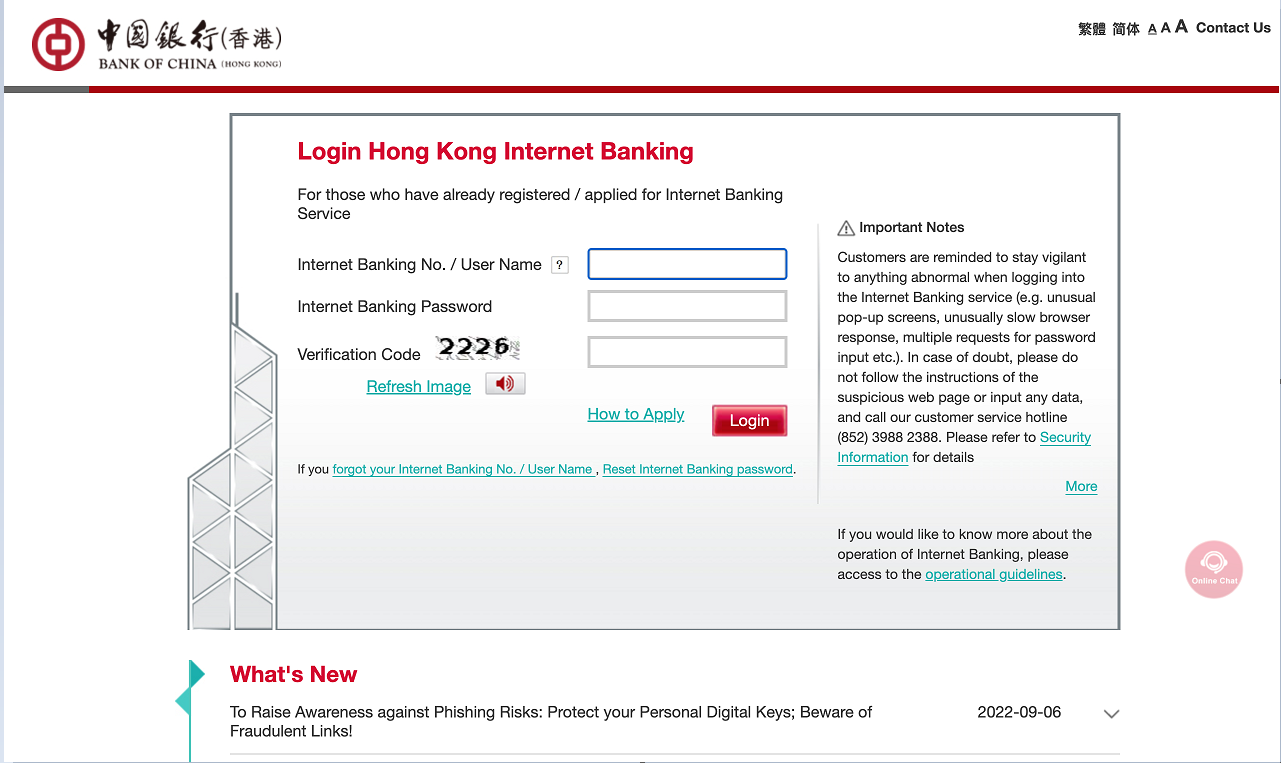
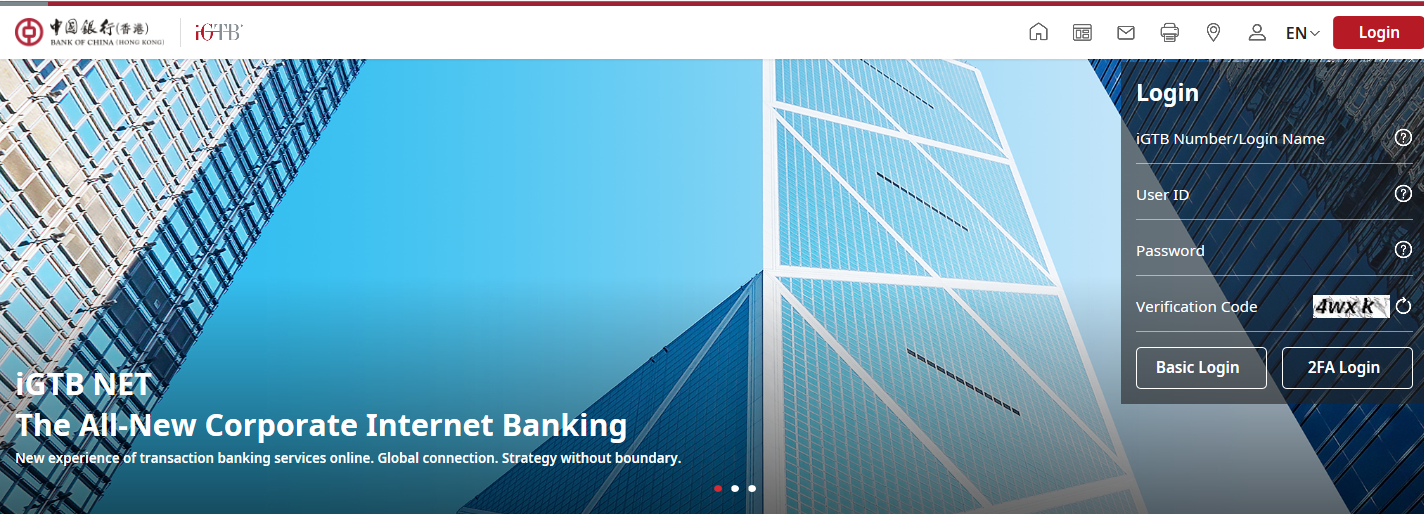
iGTB NET "2FA Login" process* (Not applicable to “e-Certificate” users)
Please input iGTB number/login name, user ID, password, verification code and then press "2FA Login"
In the "2FA Login" page, please input “Security Code”
 generated by the Security Device/Mobile Token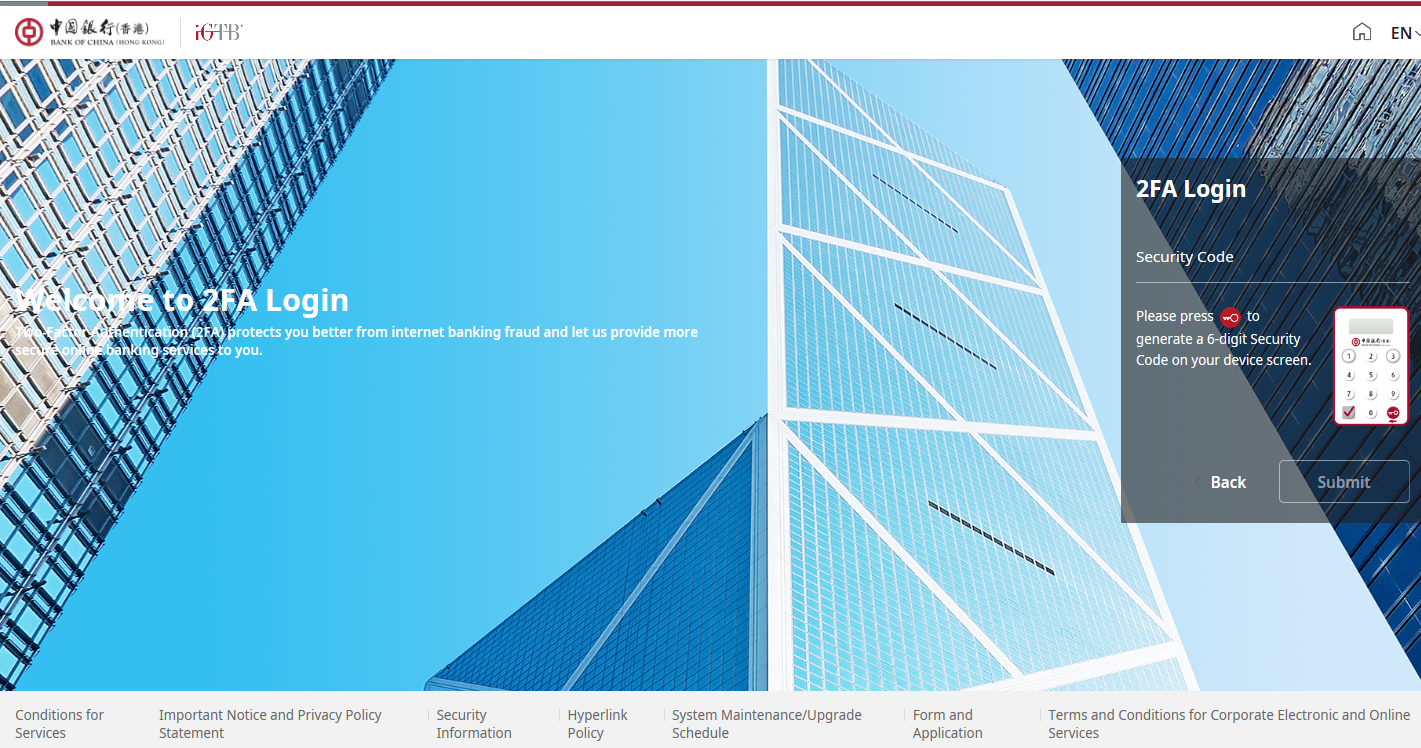
You can select "Basic Login" for account enquiry
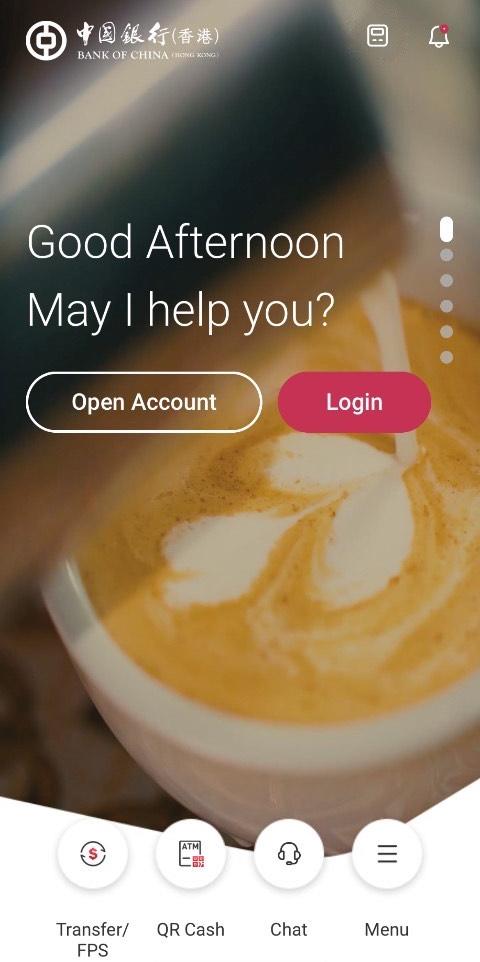
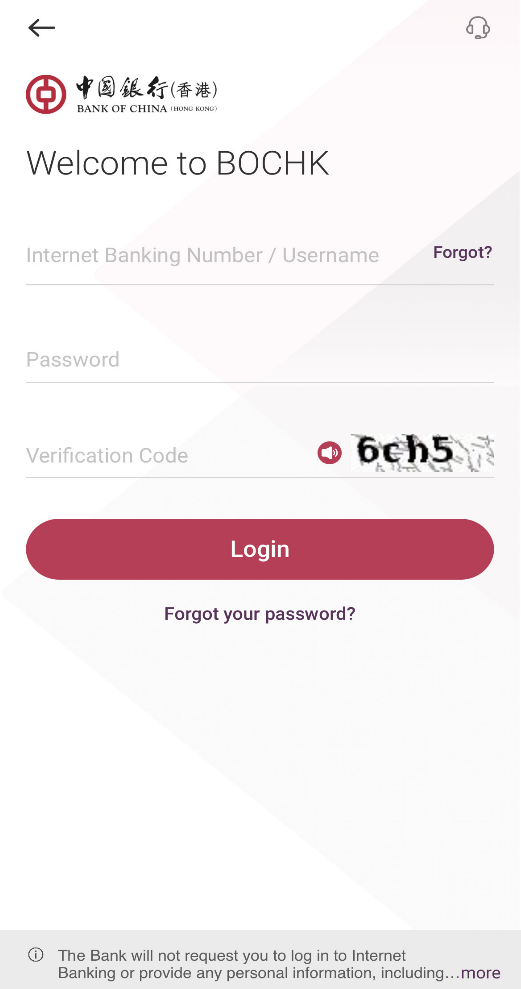
Personal Mobile Banking login process
Please input Internet Banking number/username, password, verification code, and press “Login” . Follow up by completing the verification with Mobile Token, Security Device or SMS one-time passwordYou may also choose to log in Mobile Banking using “Biometric Authentication” (e.g. fingerprint, Face ID)
iGTB MOBILE login
Please input iGTB No./login name, user ID, password and verification code, then press “Basic Login” or “2FA Login”.
You may choose to enable “Biometric Authentication” (e.g. fingerprint, Face ID) with Mobile Token to log in iGTB MOBILE.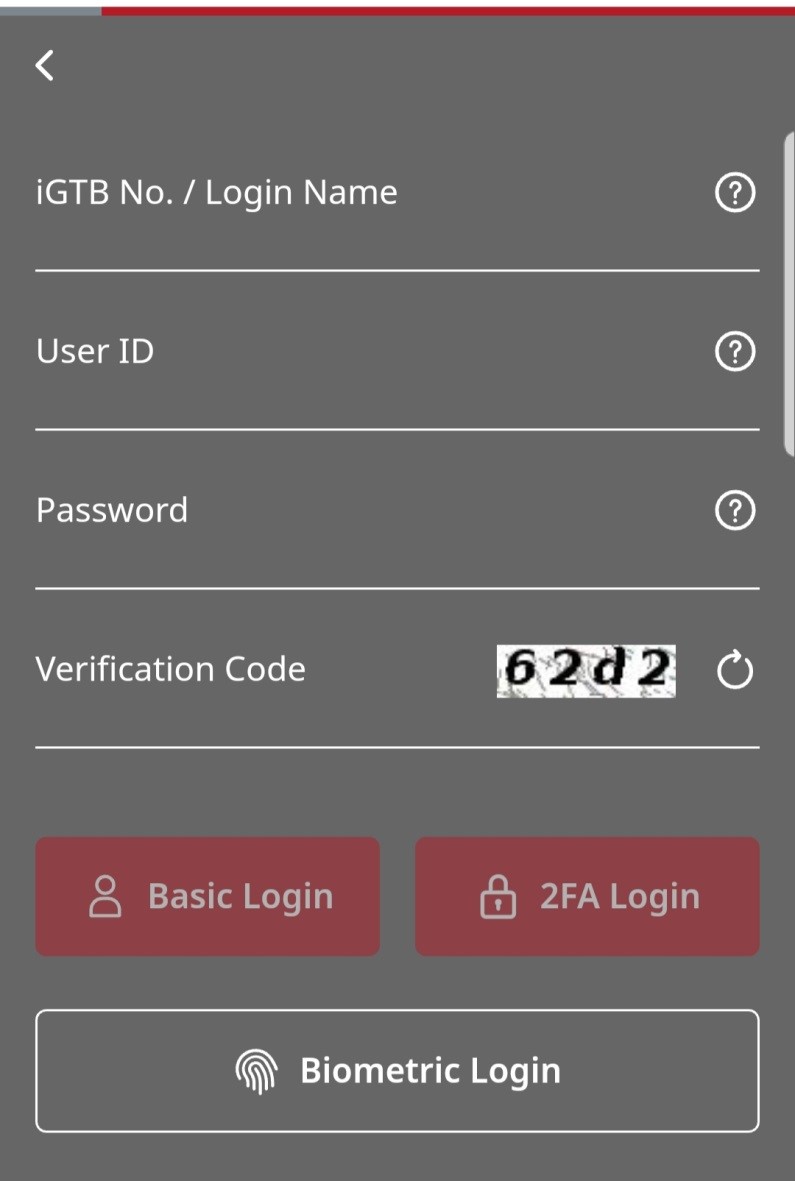
- Your authentication factors (e.g., personal password) and personal information should be well protected
- Upon receipt of your password mailer, please change the password via Internet Banking immediately and destroy the password mailer.
- Please memorise your password. Do not record password in any way without covering it.
- Do not use easy-to-guess characters as your password (e.g. name, date of birth, HKID/passport number, etc.) and avoid selecting the same password you have used for accessing other web services.
- Please keep your security device and authentication factors (such as password) properly. Do not disclose your Internet Banking username and password to anyone. You should also avoid disclosing your personal information to anyone (e.g. HKID/passport number and copy, date of birth, etc.). And you should not upload or capture your personal information by the use of any third-party website or mobile app not authorised by us or any electronic devices of other people.
- Please change your password regularly.
- You should be careful about sharing information in the social networking platform. Please prevent the disclosure of the personal information (e.g. full name, email address, date of birth, corresponding address or phone number, etc).
- You should be responsible to take reasonable steps to securely and secretly keep any devices (e.g. personal computers, Security Devices, “e-Certificates” and identity documents), secret codes (e.g. Internet Banking password, passcode and phone banking password), or Biometric Authentication (e.g. fingerprint and Face ID) used for accessing Internet Banking and activating mobile payment app.
- Do not allow anyone else to use their authentication factors; and do not forward your One-Time Password(OTP) and push notification to anyone.
- You will be responsible for all instructions given by using your devices, secret codes, or “Biometric Authentication” to log in Internet Banking.
- If you find or suspect that your authentication factors (e.g., password or two-factor authentication tools) or devices have been compromised, lost or stolen, or used by an unauthorised party, or find any unauthorised transactions associated with your account, please contact us immediately.
- The one-time “Transaction Confirmation Code” generated by the Security Device or Mobile Token is only required for "designated transactions". We will not request you to input any number to your Security Device or Mobile Token to obtain “Login/Security Code”. In case of doubt, please do not follow the instructions of the suspicious web page or input any data. Please terminate the operation of Internet Banking immediately and contact us immediately.
- You can choose to log in Internet Banking with Security Device or Mobile Token to enhance security.
- Protect your personal computer
- Please download and install updates and patches for your operating systems and browsers regularly
- Please install firewall systems on your personal computer.
- Please install anti-virus software on your personal computer. Update the virus definition file and perform virus scanning regularly.
- Please set a passcode for locking devices that is difficult to guess and activate the auto-lock function.
- Do not download or installing programmes from unreliable sources or opening suspicious files, emails or SMS. This helps protect your personal data against hackers' programmes or viruses.
- If you access Internet Banking via wireless network, please check your network security settings to ensure the network is safe and reliable.
- Please download and install updates and patches for your operating systems and browsers regularly
- Take precautionary measures while you are using Internet Banking
- Do not save or keep your password in a browser, and disable the "Auto-Complete" feature to prevent any third party from unauthorised access to your login information via the browser.
- Do not access Internet Banking through a shared computer or public wireless network.
- Only pre-set and access reliable wireless networks for internet connection.
- You should access Internet Banking through the Company’s official website. Please do not log in Internet Banking through hyperlinks in any email, SMS, QR code, search engine, social networking platform or any third-party website or mobile app not authorised by us. For enquiry, please contact us immediately.
- Suggest to close all other internet browsers before accessing Internet Banking. Do not open other suspicious internet browsers or visit any other websites while you are using Internet Banking.
- Make sure no one can see your username and password when you log in Internet Banking.
- Please check your last login and logout records every time you use Internet Banking. Always aware of our SMS and email notification and check your banking transactions regularly for any unauthorised transactions or irregularities. If you discover anything suspicious, please contact us immediately.
- Click the "logout" button to exit from the system after you have finished all your online transactions. Please always clear the cache and history in your browser after using our online service.
- If you have adopted secure media to store the “e-Certificates” as the two-factor authentication tools, please remove them from your computer and place them safely after completing your online transactions.
- Do not leave your computer unattended before logging out Internet Banking.
- To learn more about other online security measures, please click here.
- If you act fraudulently or with gross negligence such as failing to properly safeguard your devices, secret codes or “Biometric Authentication” for accessing Internet Banking, you will be responsible for any direct loss suffered by you as a result of unauthorised transactions conducted through your account.
- You will be liable for all losses if you have acted fraudulently. You may also be held liable for all losses if you have acted with gross negligence (this may include cases where you knowingly allow the use by others of your devices, secret codes or Biometric Authentication) or have failed to inform us as soon as reasonably practicable after you find or believe that your devices, secret codes or Biometric Authentication for accessing Internet Banking have been compromised, lost or stolen, or that unauthorised transactions have been conducted over your accounts. This may apply if you fail to follow the safeguards set out above if such failure has caused the losses.
- You should ensure that their contact details registered with the Company for the purpose of receiving important notifications from the Company (for example, SMS and email notifications for online payments) are up-to-date to allow relevant notifications to be delivered to the customers on a timely basis.
- Points to Notes for Corporate Internet Banking customers
- Dual authorisation for financial transactions: To enhance security, you are advised to set up dual authorisation for financial transactions to be conducted via Corporate Internet Banking.
- Accounts Activities Monitoring: You may set up incoming/outgoing fund notification to your mobile phone, email, inbox or app notification to keep track of any activities with your accounts.
- Regular Backups: A good backup strategy is essential for data security. You should always classify your data into different level of importance. If your data contains sensitive information, you should encrypt the data.
e-Cheque/e-Cashier's Order (e-CO)
- e-Cheque/e-CO is issued with Two Factor Authentication and digitally protected by Public Key Infrastructure (“PKI”) technology to ensure the integrity and confidentiality.
- Customer should be aware for unauthorised usage on e-Cheque/e-CO services. After is using the e-Cheque/e-CO, please check the transaction details in notification (email or SMS).
- Every e-Cheque/e-CO display the Issuer details:
- e-Cheque/e-CO is transmitted through email. Do not open any suspicious email to avoid your computer infected by virus and do not login Internet Banking via hyperlinks or QR Code embedded in any email or SMS. Before opening any attachment in email, please use anti-virus software for scanning the attachment.
| Bank | Prepared by |
|---|---|
| Bank of China (Hong Kong) | Bank of China (Hong Kong) Limited |
Remarks:
Designated transactions:
- Registration of third-party accounts
- Issuing e-cheque(s)/e-cashier's order(s)
- Payment of bills
- Increase transaction limit
- Other high-risk transactions
Designated investment transactions:
HK Securities / Securities Margin, A Shares Securities / Securities Margin, US Securities
- Trading
- Monthly Stocks Savings Plan
- eIPO – Subscription / Financing
Debt Securities / Certificates of Deposit
- IPO
- Buy / Sell
Funds
- Subscribe
- Redeem / Switch
- Monthly Funds Savings Plan
Precious Metal/FX Margin
- Market Order
- Good-Till-Date Order (include Trading/Delete)
Precious Metal Passbook
- Trading
Structured Investments
- Application
Currency Linked Investments
- Open Dual Currency Investment
- Open Option Linked Investment
- Squaring Contract
Equity Linked Investments
- Subscribe
Security tips for Mobile Banking and WeChat official account
Security tips for Mobile Banking
Latest Security Information:
- Please refer to the following Company's Website Security Information hyperlink for Beware of Mobile Device Malware Scams information:
https://www.bochk.com/en/security.html
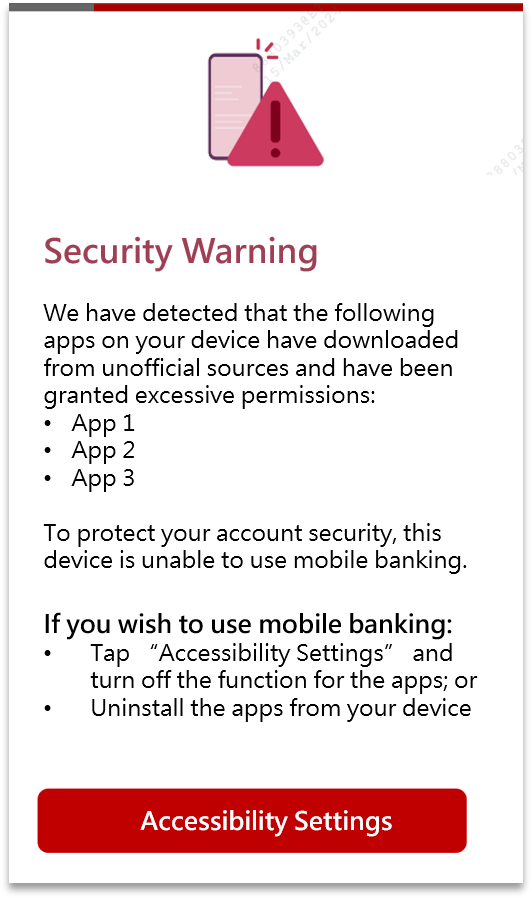
After opening mobile banking, why is a "security warning" page displayed and access is suspended?
- If the system detects any apps on your Android device which have been downloaded from unofficial app stores* with excessive permissions, you may see a "Security Warning" page and will be unable to use Mobile Banking from the device. This measure is to prevent others from controlling your Mobile Banking through suspicious apps.
- If you encounter this situation and would like to restore your access to Mobile Banking, you can turn off accessibility permission for the apps (Settings > Accessibility), or uninstall the apps.
*Official app stores include: Google Play Store, Samsung Galaxy Store, Xiaomi Mi GetApps, Huawei AppGallery, Amazon Appstore, OPPO App Market, VIVO App Store, MeiZu App Store, OnePlus App Gallery, HONOR App Gallery and LG SmartWorld App Store.
How to download Personal Mobile Banking Apps?
- Personal Mobile Banking provides various banking and securities services. You can:
- BOCHK - search “BOCHK > More > e-Banking Service > BOCHK Mobile Application” to download the Apps;
- Search "BOCHK中銀香港" (Bank of China (Hong Kong)) for free download of the Apps through the online App stores (Google Play, App Store and Huawei AppGallery).
- If there are suspicious App for downloading, please do not log in and stop proceeding the download immediately.
- To ensure the search wording is correct and prevent from downloading any counterfeit Apps which is attached with phishing program / Trojan to steal the login information.
- Do not reproduce and install any suspicious Apps on your mobile devices.
- Only download and install mobile applications provided by trusted and verified developers from official application stores.
- If there is any abnormal operation, e.g. suspicious pop up pages or a delay login, please stop the operation immediately.
- Do not click on links from suspicious SMS messages, email, attachments, websites, social media pages/posts or unknown sources. In case of doubt, please stop the operation and do not input any data. Please close the window, delete the mobile applications;
- Evaluate permissions requested from mobile applications carefully before installation, if suspicious permission rights are required, do not install the mobile application;
- Maintain proper configuration of mobile devices and do not allow installation of mobile applications from unknown sources.
Is Mobile Banking secure?
- Company's website is protected with strong encryption (TLS). Access is protected by personalised user name and password. The system is protected from duplicate access, i.e. customers cannot log in the system at the same time using different mobile devices. The session will be automatically disconnected after remaining inactive over a period of time to prevent unauthorised transaction.
How can I access and log in Mobile Banking?
- To ensure secure transactions, please download BOCHK Mobile Application from official application stores or BOCHK website, to log in Mobile Banking. Details
Have you obtained any security certification for your Mobile Banking?
- We have obtained the certificate issued by VeriSign, "Bank of China (Hong Kong) Ltd" for our Mobile Banking.
What should I be aware of when using Mobile Banking?
- Do not save or keep your password in a browser, and disable the "Auto-Complete" feature to prevent any third party from unauthorised access to your login information via the browser.
- Avoid logging in Mobile Banking via wireless network (i.e. Wi-Fi) which is public or without password setting. We advise using encrypted and reliable mobile internet connection.
- Activate the auto-lock function of your mobile devices and avoid logging in Mobile Banking in a crowded area and be careful when inputting your password via specific mobile devices. The format of password may be enlarged with clear display. It would indirectly disclose your login information to other people.
- Disable any wireless network functions (e.g. Wi-Fi, Bluetooth, NFC) or Payment Apps not in use. Choose encrypted networks when using Wi-Fi and disable Wi-Fi auto-connection settings.
- Avoid using mobile devices from other to log in Mobile Banking and sharing your mobile devices with others.
- It is recommended to setup firewall and install anti-virus software / mobile security App in your mobile devices and update regularly. You can visit HKCERT website for reference: https://www.hkcert.org/mobile-security-tools, to select the appropriate Apps.
- To protect your online transactions, we will check whether your mobile devices are jailbroken or rooted and with recommended operating systems for minimum security requirements upon using of the Bank's Mobile App. You may not be allowed to access Mobile Banking via such devices. Please pay attention to the reminder.
- Please check your last login and logout records every time you use our Mobile Banking. You should also check your account balance and transaction records regularly. If there are suspicious transactions, please contact us immediately.
- You should ensure proper protection of your password and personal information and hold accountability of this:
- Please memorise your password. Do not record the password in any way without covering it.
- Do not use easy-to-guess characters as your password (e.g. name, date of birth, HKID/passport number, etc.) and avoid selecting the same password you have used for accessing other web services.
- Please keep your security device and authentication factors (such as password) properly. Do not disclose your Internet Banking username and password to anyone. You should also avoid disclosing your personal information to anyone (e.g. HKID/passport number and copy, date of birth, etc.). And you should not upload or capture your personal information by the use of any third-party website or mobile app not authorised by us or any electronic devices of other people.
- Please change your password regularly.
- If you find or suspect that your authentication factors (e.g., password or two-factor authentication tools) or devices have been compromised, lost or stolen, or used by an unauthorised party, or find any unauthorised transactions associated with your account, please contact us immediately.
- Please download and install the latest version of the Bank's Mobile App, other Mobile Apps, operating systems and browsers regularly in the official App stores (Google Play and App Store) or our website. Do not install Mobile Apps from mistrusted sources. If there is any suspicious App, please do not download and stop the operation immediately. Please uninstall any suspicious App and reset to factory setting if necessary to ensure the App is completely removed.
- You should use all reasonable care to keep your mobile devices secure. If you find that your mobile devices have been lost or stolen or that any unauthorised transactions have occurred, you should contact us immediately.
- You should ensure that their contact details registered with the Company for the purpose of receiving important notifications from the Company (for example, SMS and email notifications for online payments) are up-to-date to allow relevant notifications to be delivered to the customers on a timely basis.
What should I be aware of when using Biometric Authentication service?
- Upon the successful registration of the “Biometric Authentication” service on your mobile devices, any fingerprint or Face ID that being stored on your mobile device can be used for the purpose of the “Biometric Authentication” service. You must ensure that only your fingerprint or Face ID is stored on your mobile devices, and ensure the security of the security codes as well as the passwords or codes that you can use to store your fingerprint or Face ID and register the “Biometric Authentication” service on your mobile devices.
- For security reasons, do not use jailbroken or rooted mobile devices.
- You can cancel the “Biometric Authentication” service by disabling the option of "Enable Biometric Authentication Login and Use Mobile Token" via "Setting > Mobile Token Setting" after logging in Mobile Banking or contacting our customer service hotline or accessing any of our branches to "suspend mobile token". Please note that after you cancel the “Biometric Authentication” service, your fingerprint or Face ID will be continuously stored on your designated mobile devices. You may consider cancelling the data at your own decision.
- If your fingerprint or Face ID record of your designated mobile devices has been changed or the “Biometric Authentication” service has not been used for a specified period of time (which shall be defined by the Bank from time to time), your “Biometric Authentication” service will be suspended. You are required to re-register or re-activate the “Biometric Authentication” service.
- You must not use “Biometric Authentication” if you have reasonable belief that other people may share identical or very similar biometric credentials of you. For instance, you must not use facial recognition for authentication purpose if you have identical twin or triplet siblings.
- You must not use “Biometric Authentication” if the relevant biometric credentials of you are or will be undergoing rapid development or change. For instance, you must not use facial recognition for authentication purpose if you are an adolescent with facial features undergoing rapid development.
What if there is an incoming call or weak signal when I am placing an instruction? How can I ensure the instruction has been submitted?
- If your instruction has been successfully submitted and executed, a transaction reference number will be displayed on the webpage of Mobile Banking. You can also check the last ten transaction records as to whether the instruction has been successfully submitted and executed.
Do I need to close the web browser after logging out Mobile Banking?
- You are advised to close the web browser after logging out and delete the temporarily saved and past historical records on a regular basis.
Security tips for WeChat official account
In order to ensure the services and information are provided by our company, please refer to the following registered WeChat ID when searching for the WeChat official accounts. Please do not disclose your personal and account information to any unauthorised WeChat account(s). Should you have any queries, please contact the company’s staff immediately.
The company has registered the following WeChat ID:
| Bank Name | WeChat ID |
|---|---|
| Bank of China (Hong Kong) Limited “BOCHK” | BOCHK_Banking |
Points to note when using WeChat official account?
- When performing account binding, user is required to set up a 8-digit “WeChat password” of which three or more consecutive numbers and “12345678” are not accepted. User should take necessary prudential measures to safeguard your password, please do not disclose your password to anyone (including the company’s staff).
- Please do not access WeChat official account via hyperlinks or QR Code embedded in any emails or SMS.
- Please do not input personal sensitive information into WeChat dialogue box. The company will not ask user to provide account number, password and personal information via WeChat dialogue box.
- If you receive calls purportedly from staff of any organisations (including the company and WeChat), user should search the corresponding contact phone numbers on official websites or applications.
- User should check the security tips provided by BOCHK from time to time. If user finds or believes that their passwords or devices linked with the bank have been leaked, lost or stolen, or any unauthorised transactions have occurred, user should contact us immediately.
- For more details of account binding, Please click here
- For enquiry, security issues report and unbinding account request, please call:BOCHK Personal Customer Service Hotline +852 3988 2388.
- To ensure customer data security, the recommended operating systems and browsers are as follows:
- iOS 14 or above (Default browser), WeChat 6.3.18 or above
- Android 8.1 or above (Default browser), WeChat 6.3.18 or above
- Please download and install updates and patches for your Apps, operating systems and browsers regularly.
Security Tips for BOC Card and BOC Mastercard® Debit Card
Protecting your ATM card and PIN
- Please keep close tabs on your BOC Card and/or BOC Mastercard® Debit Card (including virtual card). Keep the card in a safe place, destroy the original printed copy of the PIN and memorise your PIN and change it regularly.
- Please avoid writing down or recording the PIN on the physical card or on anything usually kept with or near the card without disguising it.
- For security reasons, you are advised not to use password only composed by one type of your own personal data, e.g. your identity card number, birthday date, telephone number, commonly used combinations of numbers (e.g. 123456) or other easy-to-guess numbers as your PIN. You are also advised not to use the same PIN to access other services, including internet banking or other websites.
- Please do not allow anyone else to use your BOC Card and/or BOC Mastercard® Debit Card or PIN.
- Please note that the police and bank staff will never ask you for the PIN. Do not disclose your PIN to anyone under any circumstances.
- Before using an ATM, please check if the keypad cover is abnormal (has been removed or installed with imaging facility), also if there are any suspicious devices near the card slot and keypad. If you notice anything suspicious, please notify the related bank immediately.
- Please cover the keypad with your hand when entering your PIN at ATM or Point-of-Sale devices and make sure no one is looking over your shoulder or standing next to you.
- The Bank will send you security messages by either text messaging or other form of alert under certain circumstances. Please check once received.
- You should promptly report any notice or suspicion loss, theft, disclosure or unauthorised use of your BOC Card and/or BOC Mastercard® Debit Card and/or PIN to our “Online Chat” in Internet Banking or Mobile Banking or by calling our 24-hour Customer Service Hotline at (852) 2691 2323.
- You can login to Mobile Banking, Internet Banking, Online Chat, 24-hour Customer Service Hotline or visit any of our branches to block or unblock the Card. Please note that once the Card is blocked, it will not be able to conduct any transactions until you unblock the Card. Temporary blocking of the Card does not constitute a report of loss or cancellation of the Card.
Protect your BOC Card and/or BOC Mastercard® Debit Card information
- Avoid disclosing the personal information to anyone including the card number and security code of BOC Card and/or BOC Mastercard® Debit Card.
- Properly dispose documents which containing BOC Card and/or BOC Mastercard® Debit Card information - e.g. Bank statements and transaction receipts – You can shred or tear them into small pieces so that no one can retrieve information from them.
- Check immediately with us if any suspicious transactions found, or non-receive your statement.
- Ensure that you get your BOC Card and/or BOC Mastercard® Debit Card back after every purchase. Check if you have received back your own card after transaction completed.
- Do not save or share your virtual card by screen capture on mobile device.
- Do not check your virtual card information in public area to avoid information leakage.
Exercise Care at ATM Withdrawals
- Please avoid being distracted when withdrawing cash so as not to leave banknotes and your BOC Card and/or BOC Mastercard® Debit Card at an ATM unattended or uncollected. Print a receipt for record and count the banknotes immediately after each cash withdrawal.
- Do not remove from an ATM dispenser any uncollected banknotes left behind by a previous user. The banknotes will be automatically retrieved by the machine after a designated period of time.
- You can use your BOC Card to exchange and withdraw RMB or foreign currencies from the registered HKD account via BOCHK’s designated ATMs. You can also use your physical BOC Mastercard® Debit Card to exchange and withdraw 12 major currencies / foreign currencies from the registered HKD account or MTC account (if applicable) via the Bank’s designated ATMs.
Warm Tips
- On receipt of your new BOC Card and/or BOC Mastercard® Debit Card, please follow instruction on letter to proceed card activation and sign on the back of the card with a fast ink ballpoint pen (except virtual card).
- Do not place your BOC Card and/or BOC Mastercard® Debit Card near any magnetic objects, such as mobile phone, magnetic button of a handbag or any device with a magnetic or electronic sensor.
- Once your new card is activated or beyond the 30th day from its issuance date, your old card (if any) will automatically become void; please cut it across the embossed card number and the chip before disposal. For upgraded card, i.e. upgrading from the BOC Mastercard® Debit Card to the BOC Private Wealth Mastercard® Debit Card, you can continue to use your BOC Mastercard® Debit Card for 30 days after card upgrade, or until BOC Private Wealth Mastercard® Debit Card is activated (whichever is earlier). Then the old card will become invalid. The existing BOC Mastercard® Supplementary Debit Card can still be used for 18 months before the activation of the new card.
- Should you have to return your card to the bank, please cut your card through the chip and the embossed card number beforehand. If there are any unauthorized transactions involved, please do not cut your card.
- The Daily Limit for POS Transaction and Transfer for BOC Card is preset at HKD/RMB 50,000, you can lower your limit through Mobile Banking, Internet Banking, Online Chat or Customer Service Hotline (852) 2691 2323.
- The maximum daily spending limit (including transferring to other accounts in the same currency (not applicable to supplementary cards), “Mastercard” POS transaction and online spending) for Platinum BOC Mastercard® debit cards (including principal and supplementary cards) is HKD 200,000 (or its equivalent in other currencies) (The default daily spending limit is HKD 50,000 when card newly issued), while the maximum daily spending limit (including transferring to other accounts in the same currency (not applicable to supplementary cards), “Mastercard” POS transaction and online spending) for World BOC Private Wealth Mastercard® debit cards (including principal and supplementary cards) is HKD 300,000 (or its equivalent in other currencies) (The default daily spending limit is HKD 100,000 when card newly issued) and can be adjusted by the principal cardholder. Upon activation of the card, you signify that you agree to such default limit. The daily cash withdrawal limit for debit cards (including principal and supplementary cards) is subject to the local daily cash withdrawal limit of the principal cardholder. The maximum local daily cash withdrawal limit is HKD 80,000 (or its equivalent in other currencies). If principal cardholders prefer to have a lower limit, please adjust in Mobile Banking / call Customer Service Hotline (852) 2691 2323 or visit any of our branches in person. The changes will be effective immediately after the Bank receives the request.
- You shall check and comply with all security information and advice provided the Bank from time to time to protect your BOC Card and/or BOC Mastercard® Debit Card, PIN and Mobile Device, including, without limitation:
- follow the security measures shown on BOCHK Mobile Banking App to keep the Mobile Device and virtual card secure and confidential, for example, not allowing any person to use the Mobile Device (in particular, after logging in to BOCHK Mobile Banking App), not storing any biometric credentials of other person in the Mobile Device, not using facial recognition in case of having identical twin sibling or if the facial features may change rapidly, or removing the virtual card and/or the relevant Mobile Card(s) from the Mobile Device at the time of termination of the card or disposing of such device;
- in respect of each Mobile Card, comply with the security requirements provided by the relevant service provider.
- Please notify the Bank as soon as practicable for any change of your personal information, in particular, mobile number, email address and mailing address.
Safe Use of Overseas ATMs
- To use your BOC Card to withdraw cash from an overseas ATM on the “UnionPay” network will incur a handling fee, the handling fee can be enquiry at “General Banking Service Charges”. Please visit “UnionPay” website www.unionpayintl.com/hk/ to find out more about overseas ATM locations and if ATM network(s) in your intended overseas destination can provide the cash withdrawal service you require.
- You can use BOC Mastercard® Debit Card to withdraw cash in local and overseas ATMs via “BOCHK” network, “JETCO” network and “MasterCard / Cirrus” network. Fees may be charged for cash withdrawal transactions via specific ATM networks in certain areas. For details, please view “General Banking Services Charges”.
- The outside Hong Kong daily cash withdrawal limit of each ATM Card is preset at HKD 0 to improve its security. You must therefore activate the ATM cash withdrawal function in advance and before you leave Hong Kong by setting the cash withdrawal limit and the validity period through the relevant designated channels to enable you to enjoy cash withdrawal service outside Hong Kong (The limit of BOC Mastercard® Supplementary Debit Card can only be set by the principal cardholder). Designated channels are:
- Internet Banking (Only applicable to BOC Card)
- Mobile Banking
- The BOCHK Group ATMs (Not applicable for setting the limit of BOC Mastercard® Supplementary Debit Card)
- 24-hour Customer Service Hotline (852) 2691 2323
Please visit Note of Outside Hong Kong ATM Cash Withdrawals Limit Setting and Note of Outside Hong Kong Daily Cash Withdrawal Limit Setting for details.
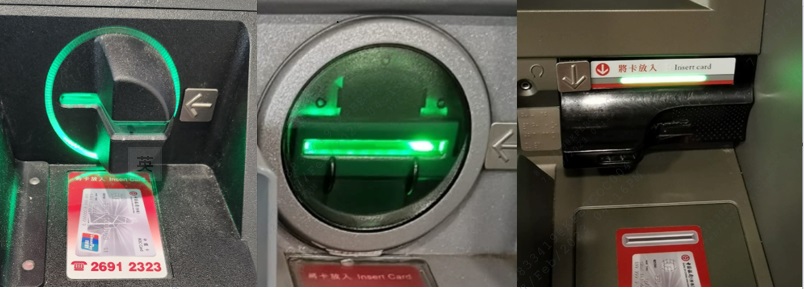
The normal card slot of an ATM
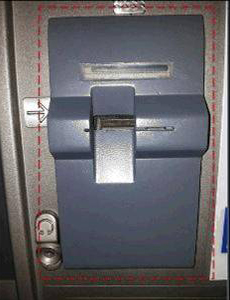
An unusual card reader installed at the card slot
Perform safe online or mobile payment and fraud prevention advice
- Do not use unsecured, unknown public WIFI to process sensitive data related activities – e.g. login online banking, online shopping with BOC Mastercard® Debit Card , mobile payment app activation and mobile payment app with BOC Card and/or BOC Mastercard® Debit Card account binding.
- You should be responsible to take reasonable steps to securely and secretly keep any devices, secret codes, or Biometric Authentication (e.g. fingerprint and Face ID) used for accessing and activating mobile payment app.
- Choose mobile payment app under HKMA regulation and licensing system to protect your rights and interests. And install related mobile payment app from official applications store on your mobile device operation system.
- Enable screen lock authentication setting on your mobile device (e.g. passcode / Biometric Authentication) to avoid unauthorized person access your device and personal data when it was stolen / lost.
- Disable the auto-save and auto-prefilled function on your internet browser to avoid personal data leak to third party through internet browser.
- Please carefully protect your personal information. Do not disclose your sensitive personal information, account / BOC Card and/or BOC Mastercard® Debit Card details, user names and passwords, including the SMS one-time password, to anyone.
- Verify transaction details carefully, such as merchant name, transaction type, transaction amount and currency, before inputting one-time password for any transaction authorization.
- Do not open email, SMS messages, attachments or click on the hyperlink and websites from unknown sources, or install suspicious mobile applications. In case of doubt, please stop the operation and do not input any data. Please close the window and contact the Bank immediately.
- Perform each mobile payment transaction with passcode / Biometric Authentication.
- Before scanning QR code for mobile payment, you should ensure QR code is generated by Merchant and check the transaction details carefully.
- Keep your QR code which generated for mobile payment safe and secure, do not easily disclose it to anyone.
- Delete your BOC Card and/or BOC Mastercard® Debit Card information (e.g. performed card binding or activated mobile payment app) from your mobile device according to the instruction and guidelines issued by relevant mobile payment service provider before discard your device / hand over to others.
- Stay vigilant - always check every transaction notification from us and verify all your BOC Card and/or BOC Mastercard® Debit Card transactions on a regular basis for any unauthorized transactions. Contact us immediately should you encounter any unauthorized transactions or irregularities.
- If customers have logged in to the aforesaid fraudulent websites and provided personal information, please immediately contact Customer Service Hotline at (852) 3988 2388 (press 3, # and 3 after language selection), and contact the Police. If customers have provided any password, please change the password immediately.
What should I be aware of when using Biometric Authentication service?
- Please visit our Security information website “What should I be aware of when using Biometric Authentication service?” section for details.
Two-way alert SMS or notification on BOC Mastercard® Debit Card transaction / activity
- If unusual transaction / activity is detected on your BOC Mastercard® Debit Card , we will send you a two-way alert SMS to your registered mobile phone number or a notification via BOCHK Mobile Banking Application on your mobile device (such notification can be viewed under “Message Centre”), inviting you to reply whether you have authorised / initiated it. Please carefully verify the details in the SMS / notification, such as merchant name, transaction type, transaction amount and currency, before replying to that SMS / notification.
- If you have authorised the transaction / initiated the activity, please reply with "1" or “Confirm” after verifying that the SMS / notification content is correct. If you have not authorise / initiate it, or the SMS / notification content is incorrect, please reply with "9“ or “Deny”. We will follow up per your response, including immediate suspension of your BOC Mastercard® Debit Card and contacting you for further details after receiving the reply of “9” or “Deny” .
- Please note that:
- Do not provide any personal and BOC Mastercard® Debit Card information when replying that SMS/ notification. You may be charged for sending SMS or using mobile data on logging in to your BOCHK Mobile Banking by your telecom service provider.
- If you have incorrectly replied that SMS / notification, please contact us immediately.
- If you receive that SMS / notification overseas, please contact us immediately and do not reply that SMS / notification.
Learn more about ATMs and mobile payment security information
- Hong Kong Monetary Authority
- ATMs: https://www.hkma.gov.hk/eng/smart-consumers/atms
- Mobile wallet: https://www.hkma.gov.hk/eng/smart-consumers/e-wallets-and-prepaid-cards/
- Hong Kong Police
- Crime Prevention advice – Tips for E-Shoppers: https://www.police.gov.hk/ppp_en/04_crime_matters/cpa/cpa_eshop.html
Two Factor Authentication
Two-factor Authentication Tools
To enhance the online security level, the Company provides customers with a comprehensive range of two-factor authentication tools to safeguard the designated transactions and designated investment transactions* performed by customers via Internet/Mobile Banking.
Types of Two-factor Authentication Tools:
“Mobile Token”
“Mobile Token” is a built-in function of BOCHK Mobile Banking. Once the “Mobile Token” is activated, you will be spared the hassle of carrying a separate physical “Security Device” to truly enjoy convenient and secure banking.
Upon activating the “Mobile Token” on compatible mobile device, you can confirm designated Mobile Banking transactions or designated investment transactions* via the preset passcode or using “Biometric Authentication”. In addition, you can also confirm designated Internet Banking transactions or designated investment transactions* by generating a one-time “Security Code”/“Transaction Confirmation Code” via the “Mobile Token”.
Features:
| More convenient Free from the hassle of carrying a separate physical "Security Device" |
More simple Confirm various transactions, such as third-party fund transfer, investment transactions, and more |
More secure
|
Biometric Authentication
You can register “Biometric Authentication” (e.g. Fingerprint, Face ID) on your mobile device for the following services when you activate the “Mobile Token”:
- Log in Mobile Banking
- Enable the “Mobile Token” to confirm designated Mobile Banking transactions or designated investment transactions*
- Enable the “Mobile Token” to generate a one-time “Security Code”/“Transaction Confirmation Code” to confirm designated Internet Banking transactions or designated investment transactions*
Activating the Mobile Token
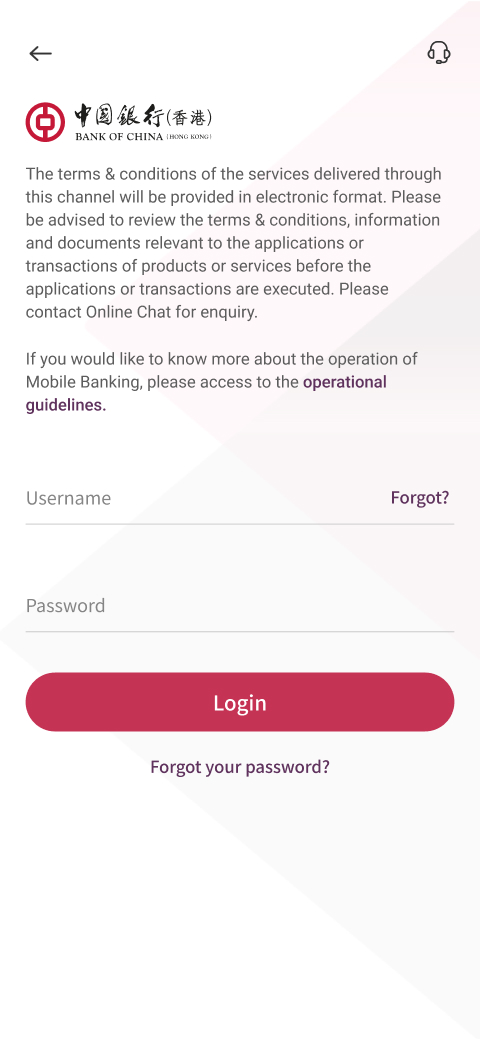
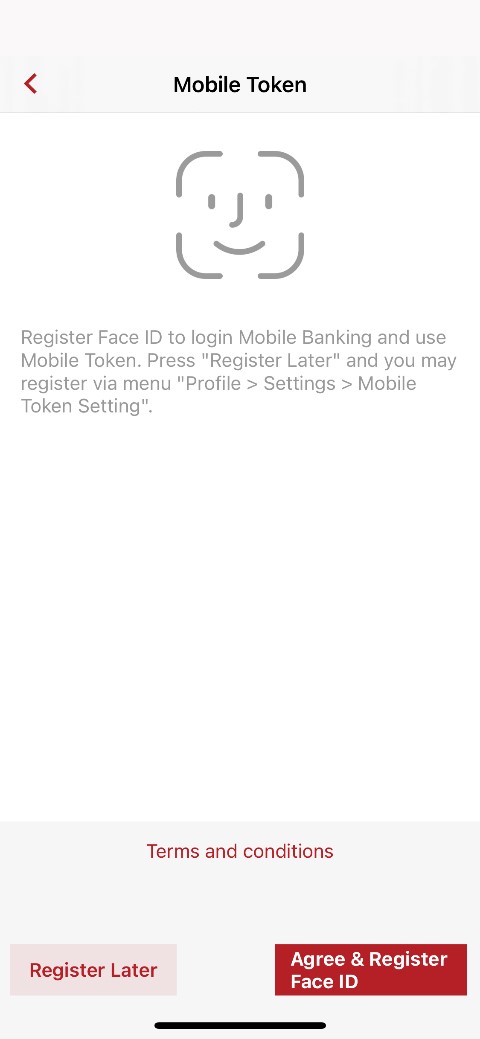
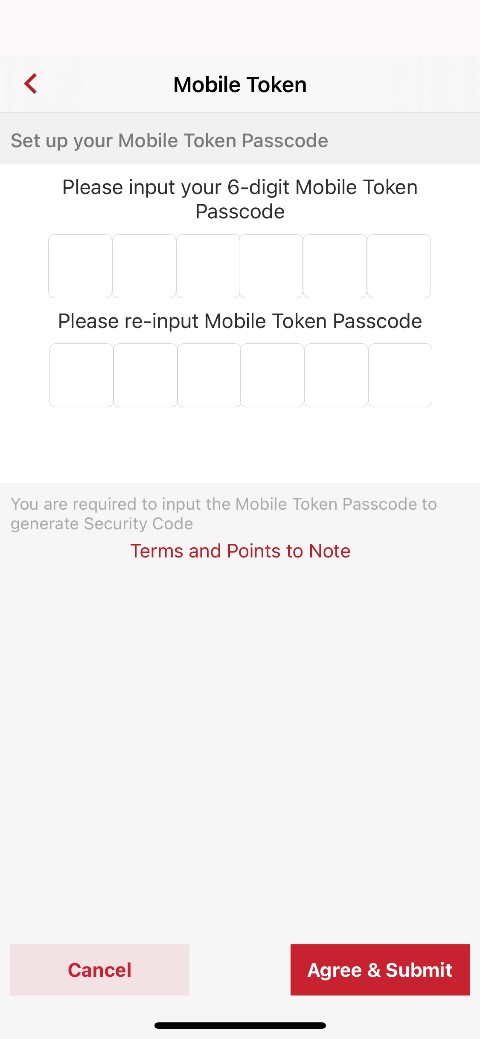
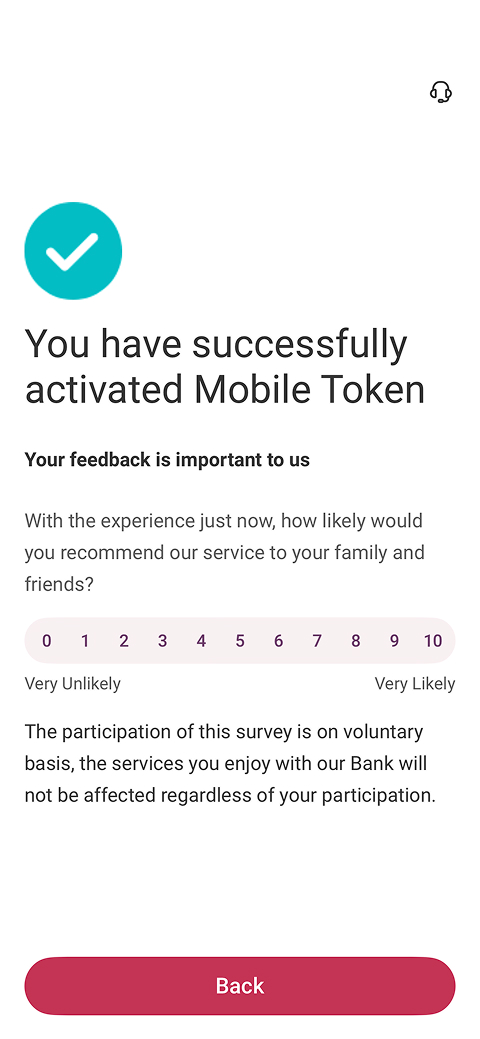
Personal Customers:
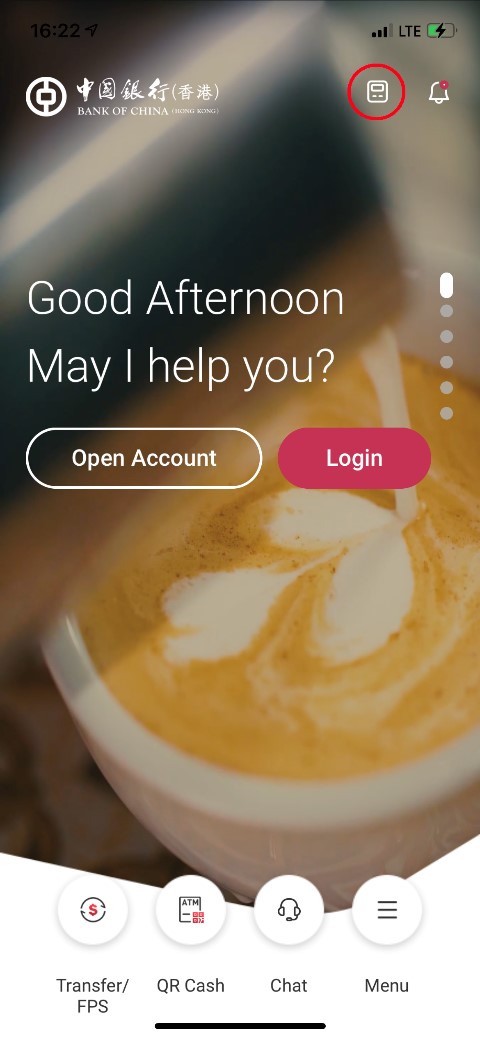
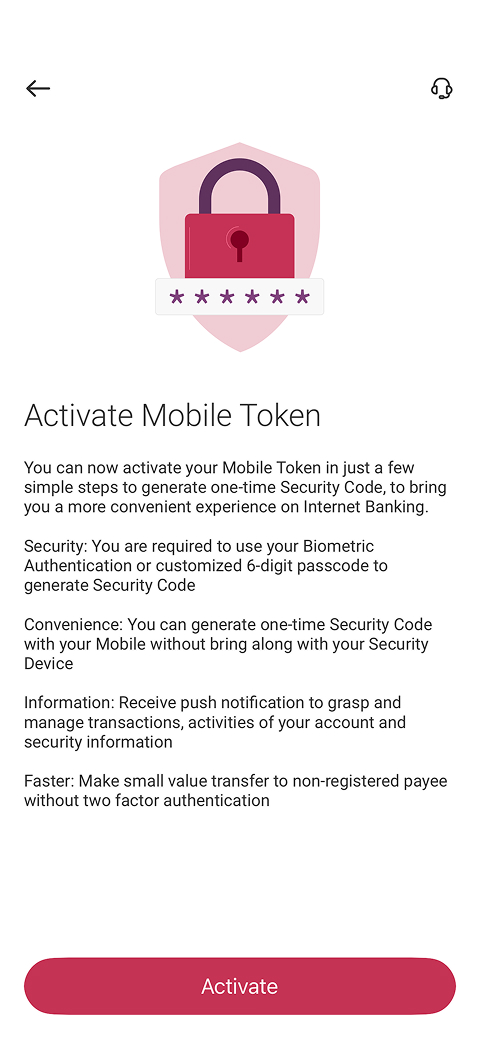
| 1. Select “Mobile Token” icon on the homepage of BOCHK Mobile Banking (indicate in red circle below) | 2. Select “Activate” | 3. Log in to Mobile Banking |
 |
 |
 |
| 4. Register “Biometric Authentication” (Option to register later) | 5. Set up “Mobile Token” Passcode | 6. Follow the instructions on the page to complete the activation |
 |
 |
 |
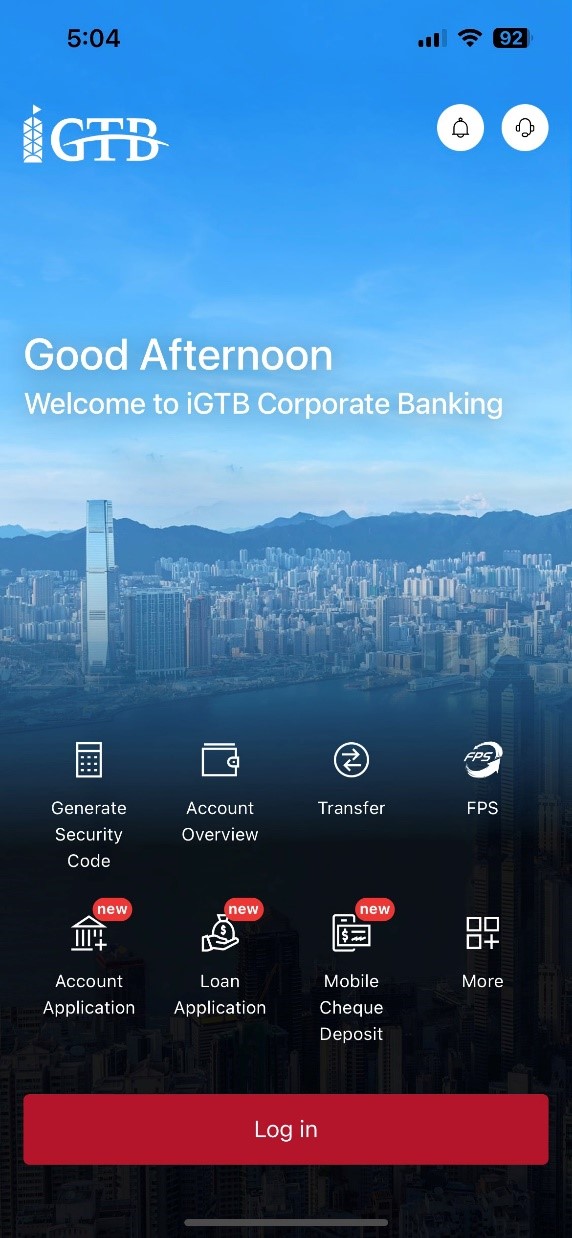
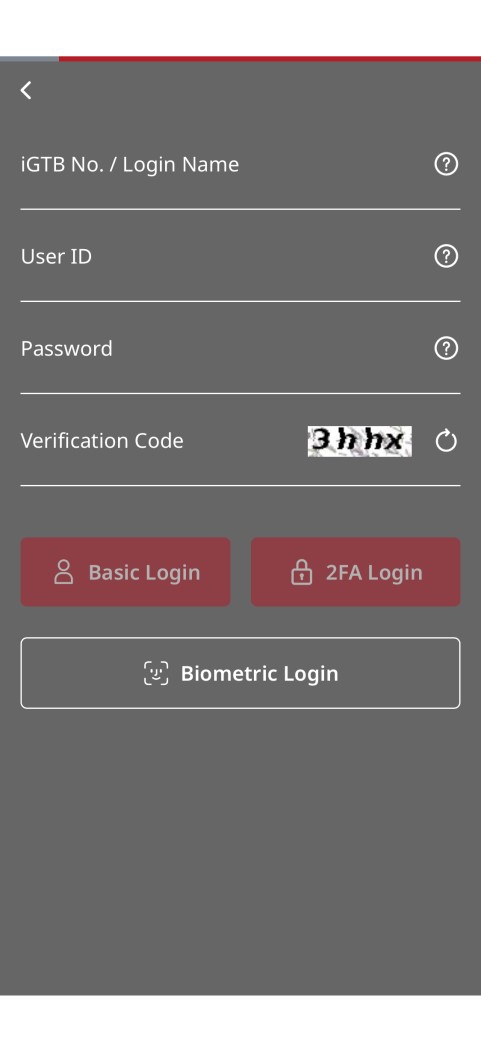
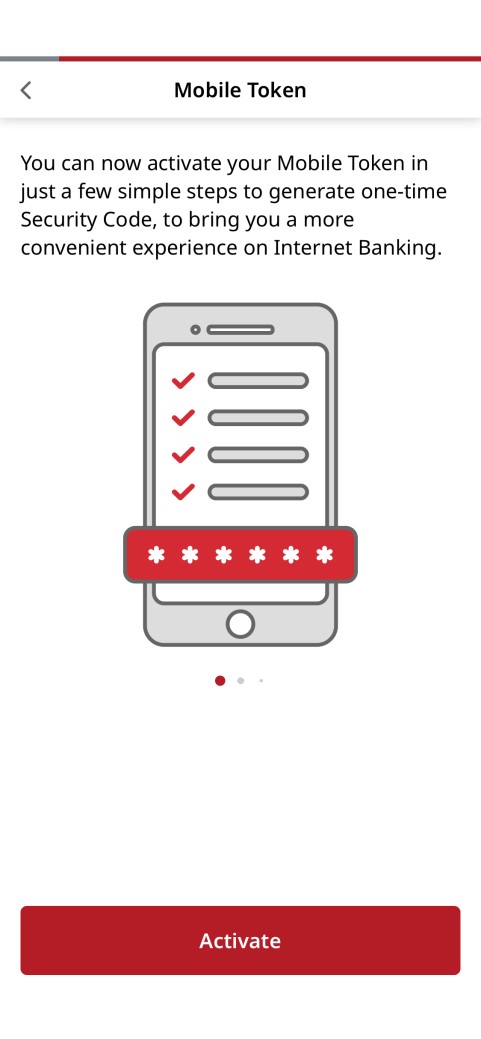
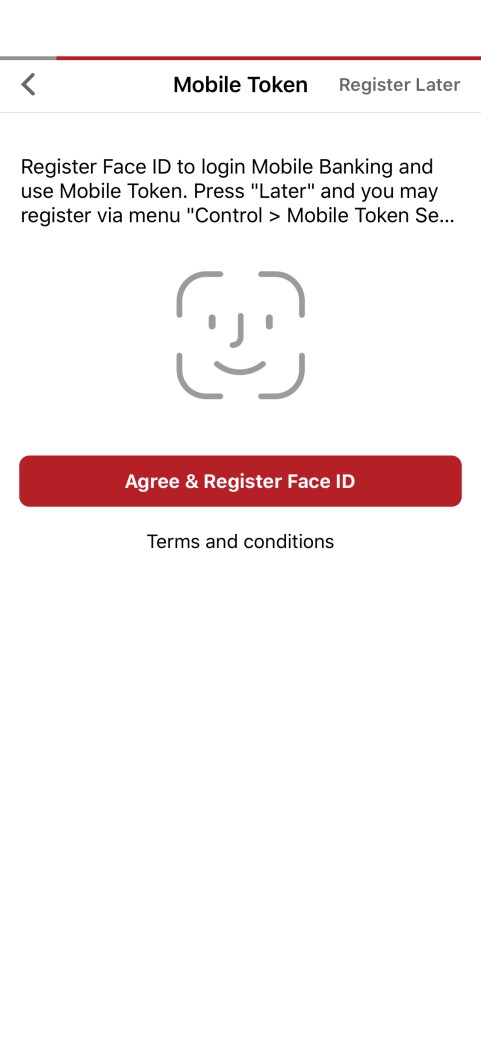
Corporate Customers:
| 1. Select “Mobile Token” icon on the homepage | 2. Log in Mobile Banking | 3. Select “Activate” |
 |
 |
 |
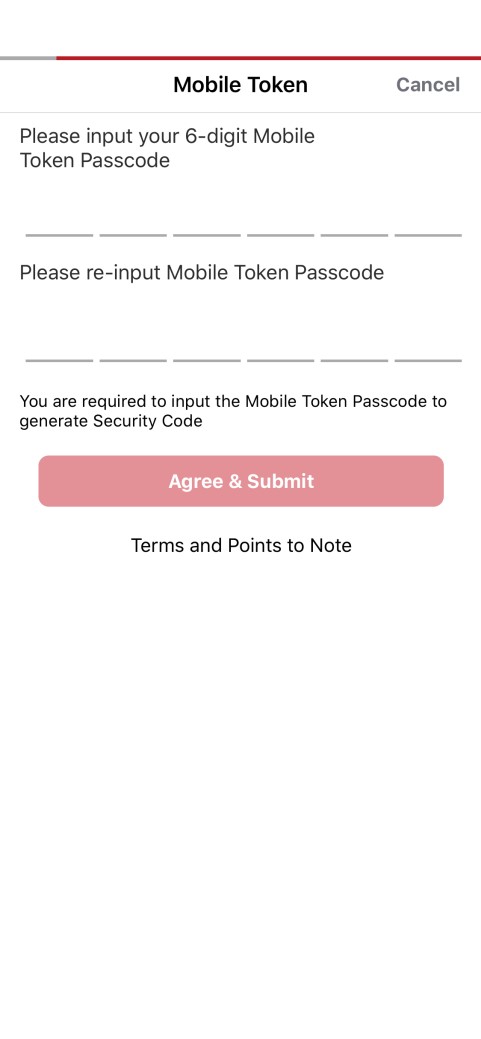
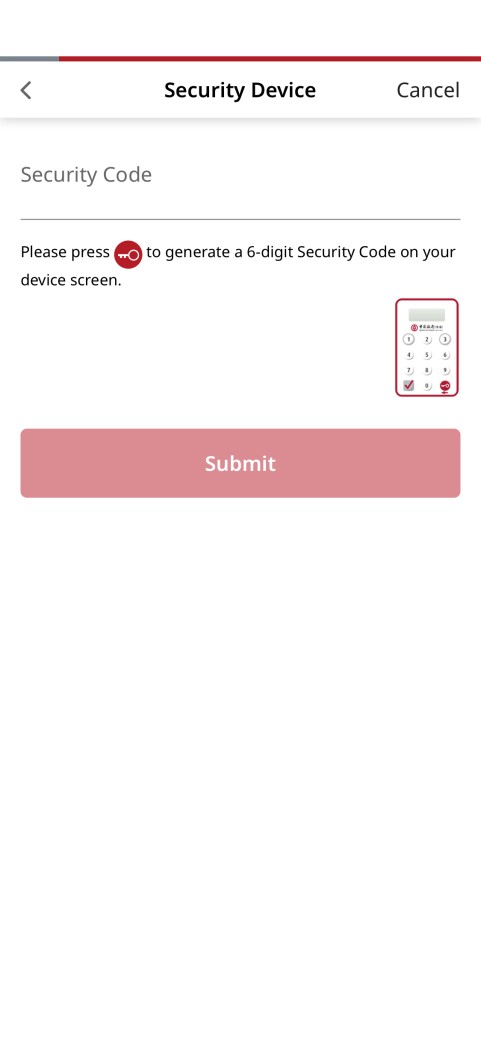
| 4. Register “Biometric Authentication” (Option to register later) | 5. Set up “Mobile Token” Passcode | 6. Input “Security Device” one-time “Security Code” |
 |
 |
 |
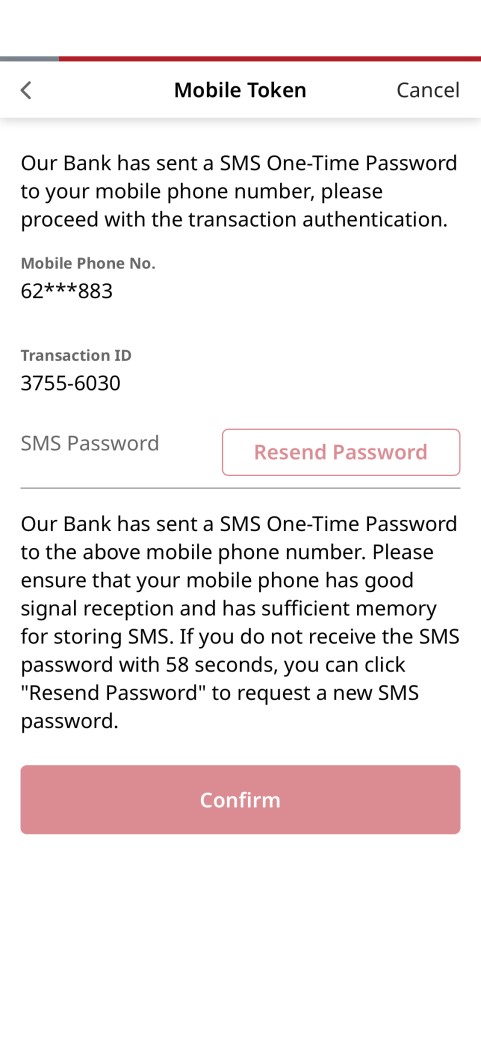
| 7. You will receive an “SMS One-Time Password” (OTP) from the mobile phone number registered with the Bank, input the OTP to complete the activation | ||
 |
Operating system requirements and compatible mobile device:
| Mobile Token | iOS | Android | ||
| Operating System | Personal Customers | Corporate Customers | Personal Customers | Corporate Customers |
| iOS 14 or above | iOS 14 or above | Android 8.1 or above
|
Android 8.0 or above | |
| Biometric Authentication |
|
|
||
Download Mobile Banking:
Please download BOCHK Mobile Banking now to activate the "Mobile Token"
 |
Download now Android users |




Points to Note for “Mobile Token”:
- For security reasons, customer can only activate “Mobile Token” on one mobile device.
- For personal customers, upon successfully activation of “Mobile Token”, the “Security Device” (if any) will be suspended. For reactivation of “Security Device”, customers are required to suspend the “Mobile Token” on your mobile device.
- Corporate customers can hold both “Mobile Token” and “Security Device” at the same time.
- Please keep your mobile device that has activated “Mobile Token” function in a safe and secure place. In case of loss or damage, please suspend the “Mobile Token” and contact us immediately.
Remarks:
- Apple and the Apple logo are trademarks of Apple Inc., registered in the U.S. and other countries. App Store is a service mark of Apple Inc.. Android, Google Play, and the Google Play logo are the registered trademarks of Google Inc.. Huawei AppGallery is provided by Huawei Services (Hong Kong) Co., Limited. HUAWEI EXPLORE IT ON AppGallery and the HUAWEI EXPLORE IT ON AppGallery logo are the registered trademarks of Huawei Technologies Co., Limited.
“Security Device”
Personal customers (except BOC Credit Card) can visit any of our branches to apply for “Security Device”. Primary Users of corporate customers can apply by submitting application form to any of our branches, or apply for Delegated Users through Corporate Internet Banking. "Security Device" with audio capability is also provided for the convenience of the visually impaired using Internet/Mobile Banking.
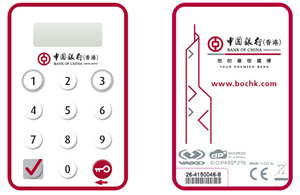
Points to Note for “Security Device”:
- Upon receipt of the "Security Device", please log into the Internet Banking immediately and follow the instructions to activate the "Security Device".
- Please keep your "Security Device" in a safe and secure place. Do not allow anyone to use your "Security Device" or leave it unattended. In case of loss or damage, please contact us immediately.
“e-Certificate”
Corporate customers can apply for “e-Certificate” as the two-factor authentication tool by submitting the application form to any of our branches. Upon completion of application, “e-Certificate” will be mailed to the registered correspondence address of the customers.
Below are the reminding notes for keeping your “e-Certificate” safe:
1. DO NOT disclose the passphrase to anyone (including BOCHK staff).
2. Change the passphrase of “e-Certificate” periodically.
3. Keep the “e-Certificate” in a safe place by a designated person/party to prevent unauthorized use of the device(s).
4. Keep the “e-Certificate” and the passphrase by different persons/parties.
5. Ensure the “e-Certificate” is completely unplugged/loaded off from your file transmission system after connection and keep in a safe place. DO NOT leave the “e-Certificate” unattended
6. Keep the system connect with terminal (e.g. iGTB CONNECT terminal) in a secure and safe place as well as to prevent unauthorized use.
7. If “e-Certificate” lost or suspects for any unauthorized use, please contact us immediately.
“One-Time Password”
Personal customers can receive a one-time password message through the customers’ registered mobile phone number to conduct designated investment transactions*.
Remarks:
Designated transactions:
- Transfer funds to non-registered payee
- Registration of third-party accounts
- Issue e-cheque(s) / e-cashier's order(s)
- Bill Payment (registration of designated merchant)
- Transaction limit increment
- Other high-risk transactions
Designated investment transactions:
HK Securities / Securities Margin, A Shares Securities / Securities Margin, US Securities
- Trading
- Monthly Stocks Savings Plan
- IPO – Subscription / Financing
- NotALot
Debt Securities / Certificates of Deposit
- IPO
- Buy / Sell
Funds
- Subscribe
- Redeem / Switch
- Monthly Funds Savings Plan
- Smart Invest
Precious Metal / FX Margin
- Market Order
- Good-Till-Date Order (include Trading/Delete)
Precious Metal
- Trading
Structured Investment
- Application
Currency Linked Investments
- Open Dual Currency Investment
- Open Option Linked Investment
- Squaring Contract
Equity Linked Investments
- Subscribe
Contact Us
BOCHK Enquiry Hotlines and Website
- 24-hour ATM Hotline at (852) 2691 2323
- BOCHK Internet Banking Hotline at (852) 3988 2388
- CBS Online Hotline at (852) 3988 2288
- iGTB NET Hotline at (852) 3988 1333
- BOCHK Financial Institutions Online Hotline at (852) 3988 2288
- More Enquiry Hotlines
- Website www.bochk.com
BOC Credit Card Hotline and Website
- 24-hour Customer Service Hotline at (852) 2853 8828
- Website https://www.bochk.com/en/creditcard.html
FAQ
What is Transport Layer Security (「TLS」) encryption?
Our Internet Services have adopted TLS encryption, one of the online security standards for commercial application. All data transmitted via the Internet Services are protected by this technology to ensure data security.
What precautions should I take when I set up my password?
- Set a password that is difficult to guess.
- Do not use your date of birth, HKID / passport number, telephone number or any combinations of your English name as your password.
- Do not use 3 or more consecutive identical alphabets or digits, e.g. "333", "bbb" etc.
- Do not use sequential alphabets or digits, e.g. "123", "abc, etc.
- Do not use your user name / login ID as your password.
- Don't use adjacent keys on the keyboard like "qwertyui".
- Use different passwords for different accounts, in particular those for handling private and sensitive data.
How often should I change my password?
You are advised to change your password regularly. If you have not changed your password over certain period of time, our system will remind you automatically.
How can I protect my personal information?
You may be asked to provide personal information (such as your HKID / passport number and date of birth) as additional identity verification when you use the internet banking service. Be vigilant and do not casually disclose your personal information to anyone. You should also keep documents (such as letters and bank statements) which carry your personal information in a proper and secured manner.
Why should I update my operating systems and browsers regularly?
It helps to fix security problems of the operating systems or web browsers if you update and download "patches" provided by software vendors regularly. This helps to prevent your computer from virus attacks or unauthorised access from hackers.
How can I set up the security settings of Wireless LAN?
- Do not place the Access Point (“AP”) too close to doors and windows to avoid data captured and decrypted by any third party.
- Take appropriate security measures to protect the Wireless LAN. Do not disclose the security setting of your wireless network to any third party.
Precautionary measures for using internet?
- Encrypt your data if you have to keep your personal information in an electronic storage medium to prevent unauthorised access or use by third parties.
- Do not save or keep your password in your browser and disable the "Auto-Complete" setting to prevent third parties from accessing your information via the browser.
- Disable the "File and Printer Sharing" function of the Windows system and set up proper access permissions of your computer to prevent unauthorised access to your data by third parties via the network.
- Do not download or install illegal or unknown softwares to prevent infection from computer virus or Trojan programmes. Remember to scan for virus before opening any files from external sources.
Where can I obtain more information on precautionary measures for e-Banking services?
- Hong Kong Monetary Authority
Personal Digital Keys :https://www.hkma.gov.hk/eng/smart-consumers/personal-digital-keys/
Internet Banking :https://www.hkma.gov.hk/eng/smart-consumers/internet-banking/
ATMs:https://www.hkma.gov.hk/eng/smart-consumers/atms/ - The Hong Kong Association of Banks
"Internet Banking – Keeping your money safe"
Please contact us for copies of this leaflet. - Hong Kong Police
Cyber Security and Technology Crime:http://www.police.gov.hk/ppp_en/04_crime_matters/tcd/index.html - HKSAR Government – "The InfoSec Web Site":http://www.infosec.gov.hk/en/
Security tips for BoC Pay+
How to download the BoC Pay+ mobile app?
BoC Pay+ is a one-stop local and cross-border payment mobile app, which can be downloaded from:
- Official App stores (Google Play, App Store and HUAWEI AppGallery): search for "BoC Pay+".
- BOCHK website: Home > More > e-Banking Service > BoC Pay+.
Smart tips:
- Do not download any counterfeit mobile apps to prevent your mobile devices from being infected by phishing programmes or Trojans, and to avoid fraudsters from stealing your information.
- Do not copy, install or open any mobile apps from unknown sources on your mobile devices. Do not open any suspicious files, emails, SMS, instant messaging or QR codes to prevent hacking programmes or computer viruses from stealing your information.
- Only download and install mobile applications provided by trusted and verified developers from official application stores.
- If you find any suspicious apps, do not download and stop the operation immediately.
- If you find any abnormalities, such as unusual screens or slow login response, please stop the operation immediately.
- Evaluate permissions requested from mobile applications carefully before installation, if suspicious permission rights are required, do not install the mobile application;
- Maintain proper configuration of mobile devices and do not allow installation of mobile applications from unknown sources.
Is the BoC Pay+ service secure?
Account and transaction security is our prime concern. We have comprehensive security control measures to protect you, which include but not limited to:
- We adopt internationally-recognised encryption technology to ensure the information security.
- Log in is always required before using the account services or performing transactions.
- To ensure your account safety, you can only log in to and use BoC Pay+ on one mobile device at the same time.
- Payment passcode or biometric authentication is used to authenticate transactions in BoC Pay+.
- To prevent unauthorised transactions, the QR code generated with the "QR Code Payment" function will be refreshed automatically within a specified period of time.
- Upon the completion of transactions, you will receive transaction notifications from BoC Pay+.
What should I be aware of when using BoC Pay+?
Transaction Security
- "QR Code Payment" function should only be used at merchants who support UnionPay QR codes. Never capture the QR code and any information shown on the "QR Code Payment" page, and never send or disclose the information to others.
- When performing online transactions (including credit card transactions), carefully check the details such as the name of the merchant / recipient, transaction type, payment method (e.g. mobile number, email address, FPS ID, account number or the QR code used to request payment), transaction amount, currency, etc. to ensure the transaction is correct. Do not enter your OTP recklessly. If you have any doubts, please do not authenticate the transaction with payment passcode, biometric authentication or SMS one-time passwords.
- Please check your account balance and transaction records regularly. If you find any suspicious or unauthorized transactions, please contact us immediately.
Network / Mobile Device Security
- Avoid logging in BoC Pay+ via wireless network (i.e. Wi-Fi) which is public or without password setting. We advise using encrypted and reliable mobile internet connection.
- Activate the auto-lock function of your mobile devices and avoid logging in BoC Pay+ in a crowded area and be careful when inputting your password on mobile devices which might indirectly disclose your login information to other people.
- Disable any wireless network functions (e.g. Wi-Fi, Bluetooth, NFC) or Payment Apps not in use. Choose encrypted networks when using Wi-Fi and disable Wi-Fi auto-connection settings.
- Avoid using mobile devices from other to log in BoC Pay+ and sharing your mobile devices with others.
- It is recommended to setup firewall and install anti-virus software / mobile security App in your mobile devices and update regularly. You can visit HKCERT website for reference: https://www.hkcert.org/mobile-security-tools, to select the appropriate Apps.
- You should ensure that your devices for accessing BoC Pay+ services do not being infected by virus or unauthorised accessed by malicious, corruptive or destructive program, for the retrieval, use and change of the password, Biometric Authentication (e.g. fingerprint, Face ID) or personal information.
- To protect your online transactions, we will check whether your mobile devices are jailbroken or rooted and with recommended operating systems for minimum security requirements upon using of the Bank's Mobile App. You may not be allowed to access BoC Pay+ via such devices. Please pay attention to the corresponding reminders or stay tuned to our "What's New" notices.
- Do not click on links from suspicious SMS messages, email, attachments, websites, social media pages/posts or unknown sources. In case of doubt, please stop the operation and do not input any data. Please close the window, delete the mobile applications.
- Please check your last login and logout records every time you use our BoC Pay+. If there are suspicious transactions, please contact us immediately.
- You must take all reasonable and prudent measures to keep your mobile devices and SIM card secure. If you find that your mobile devices have been lost or stolen or that any unauthorised transactions have occurred, you should contact us immediately.
Personal Information Security
- Protect your passwords, personal information, bank account and credit card information, and hold accountabilities of these:
- Please memorise your passwords. Do not record in any way without covering it.
- Do not use easy-to-guess characters as your passwords (e.g. date of birth, HKID / passport number, etc.). Avoid using the same passwords you have used for other accounts, in particular those for handling private and sensitive data.
- Please safeguard your information. Do not disclose your passwords, One-Time Password(OTP) and login information to anyone. You should also avoid disclosing your personal information to anyone (e.g. HKID/passport number and copy, date of birth, etc.).
- We will never ask for any sensitive personal information such as bank account details, credit card number/security code, Internet Banking user name, login passwords, payment passcode and OTPs through phone calls, emails or SMS messages. Please contact us immediately if you receive such request. If you receive any suspicious SMS or email messages with embedded hyperlinks purportedly to be from the Company requesting you to input any personal information, you should be vigilant and think twice. In case of doubt, please contact the Company’s Customer Service Hotline at (852) 3988 2388.
- The Company will not send SMS or email messages with embedded hyperlinks, QR codes or attachments directing customers to the Company’s website or mobile applications to carry out transactions. Nor will the Company ask you to provide any sensitive personal information, including bank account details, credit card number/security code, Internet Banking user name, login passwords, payment passcode and OTPs, via hyperlinks, or contact you via telephone voice messages.
- Do not visit any website or use any mobile app that are not verified by BOCHK. You should not upload or capture your personal information by the use of any third-party website or mobile app not authorised by us or any electronic devices of other people.
- Please change your passwords regularly.
- You should check the security tips provided by BOCHK from time to time. If user finds or believes that their passwords or devices linked with the bank have been leaked, lost or stolen, or any unauthorised transactions have occurred, user should contact us immediately.
- Take all reasonable and prudent measures to securely and properly keep your passwords (including but not limited to BoC Pay+ payment passcode, Internet Banking password, ATM PIN and one-time passwords), which are used for binding accounts / credit cards in BoC Pay+.
- You should notify us for any change of your mobile phone number or email address without delay. You are requested to remain responsible for any unauthorised use of the BoC Pay+ services by others before we receive your notification.
- You should be aware of the obligations in relation to security for BoC Pay+ and following the relevant security measures specified from time to time by us for the protection of customers. You may bear the risk of suffering or incurring any loss if not taking the security measures that we recommend.
Smart tips:
- Please download and install the latest version of the BoC Pay+ Mobile App, other Mobile Apps, operating systems and browsers regularly in the official App stores (Google Play, App Store and HUAWEI AppGallery) or our website. Do not install any software /mobile apps from mistrusted sources. If there is any suspicious App, please do not download and stop the operation immediately.
What should I be aware of when using the biometric authentication function?
BoC Pay+ uses biometric authentication technology to verify your identity for transaction authentications with the biometric credentials specified by us, including fingerprint and Face ID. The availability of biometric authentication is subject to the brand, model and operating system version of your mobile devices. When using the biometric authentication function, you have to pay attention to the following:
- Upon successful enabling of the "Biometric Authentication" function, all fingerprint(s) or Face ID stored in your mobile devices can be used for the "Biometric Authentication" function. You must ensure that only your fingerprint(s) or Face ID is stored in your mobile devices. You must also ensure the security of the passwords that are used to store the fingerprint(s) or Face ID in your mobile devices and the payment passcode that is used to enable the "Biometric Authentication" function.
- For security reasons, do not use jailbroken or rooted mobile devices.
- You can disable the "Biometric Authentication" function at BoC Pay+ Menu > "Settings" > "Payment Settings" > "Touch ID" or "Face ID" (depending on your mobile devices). Follow the instructions to disable the "Biometric Authentication" function.
- We do not store your biometric credentials. The biometric credentials you registered in your mobile devices will continue be stored in the devices even after you have disabled the "Biometric Authentication" function in BoC Pay+. You can consider deleting the biometric credentials at your own discretion.
- Do not use "Biometric Authentication" if you believe that other people may have identical or very similar biometric credential(s) to your own, or your biometric credential(s) can be easily compromised. For instance, do not use Face ID for authentication purpose if you have identical twin or triplet sibling.
- Do not use "Biometric Authentication" if your biometric credential(s) will be undergoing rapid development or change. For instance, do not use Face ID for authentication purpose if you are an adolescent with facial features undergoing rapid development.
What should I do if I find suspicious transactions?
If you find any suspicious credit card transactions, you should immediately call the BOC Card Customer Service Hotline on (852) 2853 8828. For suspicious Smart Account or Payment Account transactions, you should immediately call the BOCHK Personal Customer Service Hotline on (852) 3988 2388.
Where can I obtain more information on precautionary measures for mobile applications?
- Hong Kong Monetary Authority
Personal Digital Keys - https://www.hkma.gov.hk/eng/smart-consumers/personal-digital-keys/
Internet Banking - https://www.hkma.gov.hk/eng/smart-consumers/internet-banking/ - The Hong Kong Association of Banks
"Internet Banking – Keeping your money safe". Please contact us for copies of this leaflet. - Hong Kong Police
Cyber Security and Technology Crime - https://www.police.gov.hk/ppp_en/04_crime_matters/tcd/index.html - HKSAR Government
The InfoSec Web Site - https://www.infosec.gov.hk/en/
